Author: Dimple Rathod

  • How AI is Changing Cyber Attacks in 2026

    How AI is Changing Cyber Attacks in 2026

    AI is changing cyber attacks is no longer a future prediction it’s a reality organizations are facing right now. Artificial Intelligence is transforming the cybersecurity landscape by making attacks smarter, faster, and far more difficult to detect. While AI helps security teams identify threats more efficiently, cybercriminals are using the same technology to launch highly targeted, automated, and scalable attacks. As a result, traditional security approaches are struggling to keep up with this rapidly evolving threat environment.

    How AI Is Changing Cyber Attacks Through Phishing

    AI is changing cyber attacks is clearly visible in modern phishing techniques. Traditional phishing emails were often easy to spot due to poor grammar or generic messaging. Today, AI allows attackers to generate highly convincing and personalized phishing messages at scale.

    Common examples include:

    • AI-written emails that mimic real corporate language 
    • Voice cloning scams (vishing) using deepfake audio 
    • Personalized spear-phishing based on social media data 

    Deepfakes and Social Engineering 

    Deepfake technology has made social engineering attacks significantly more dangerous. Attackers can now generate realistic fake videos or audio recordings to impersonate CEOs, managers, or trusted colleagues.

    These tactics are often used to:

    • Trick employees into transferring funds
    • Manipulate teams into sharing sensitive or confidential information

    As deepfakes become more convincing, verifying identity is becoming a serious challenge for organizations.

    Automated Malware Development

    AI is also accelerating malware creation. Using machine learning, attackers can quickly generate new malware variants that adapt their behavior and bypass traditional antivirus solutions.

    This automation allows cybercriminals to:

    • Develop malware faster
    • Modify code to avoid detection
    • Launch large-scale attacks with minimal manual effort

    AI-Driven Vulnerability Discovery

    Attackers are increasingly using AI-powered tools to scan systems and applications for vulnerabilities automatically. This significantly reduces the time between identifying a weakness and exploiting it.

    As a result, organizations face:

    • Faster exploitation cycles
    • Increased exposure to zero-day attacks
    • Greater pressure to patch systems quickly

    Smarter Ransomware Attacks

    Modern ransomware groups are integrating AI to optimize attack strategies. AI can identify critical systems, prioritize high-value targets, and automate lateral movement within networks. 

    How AI Is Changing Cyber Attacks to Evade Security Systems

    AI enables cybercriminals to study how security tools work and adjust their tactics accordingly. These adaptive attacks can change behavior in real time to avoid triggering alerts.

    This makes traditional, rule-based security systems far less effective against AI-driven threats.

    Defensive Measures Against AI-Based Threats

    To counter AI-powered cyber attacks, organizations must strengthen their security approach. Key defensive measures include:

    • AI-driven threat detection and real-time monitoring
    • Adopting a Zero Trust security architecture
    • Regular cybersecurity awareness training for employees
    • Continuous patching and proactive vulnerability management

    Conclusion

    AI is changing cyber attacks by making them more intelligent, automated, and harder to detect. As attackers continue to evolve, organizations must do the same.

    By adopting AI-powered defenses, enforcing strong security policies, and maintaining continuous threat monitoring, businesses can stay ahead of emerging cyber threats and reduce their overall risk.

    References link:

    1. MITRE ATT&CK Framework – https://attack.mitre.org/ 

    2. NIST AI Risk Management Framework – https://www.nist.gov/itl/ai-risk-management-framework

    Latest Blog Highlights: https://embarkingonvoyage.com/blog/exception-lifecycle-in-blazor-server-application/

  • Monolith vs Microservices: The 2026 Roadmap for Tech Leaders

    Monolith vs Microservices: The 2026 Roadmap for Tech Leaders

    In 2026, most tech leaders aren’t debating whether to modernize anymore. The real question is how to modernize without slowing teams down or inflating cloud costs. That’s why the discussion around Monolith vs Microservices has become more practical and more critical than ever.

    For years, microservices were seen as the default path to modernization. But many teams learned the hard way that breaking a monolith without a clear strategy often leads to a distributed monolith more complexity, slower releases, and fragile delivery pipelines

    Modernizing an application isn’t about rewriting everything or blindly choosing microservices. It’s about understanding when a monolith still makes sense, when microservices actually help, and how to evolve your architecture incrementally.

    This article outlines a 2026-ready roadmap for navigating the Monolith vs Microservices decision focused on real-world delivery, developer velocity, and modernization that actually works.

    In the trenches, “velocity” is more difficult to experience than it is to discuss in a boardroom. My team was caught in a cycle that many of you will recognize before we switched to our current roadmap. Although we were proud of our CI/CD setup, it had turned into our largest bottleneck.

    When teams debate Monolith vs Microservices, the conversation usually stays at the architecture level. But for us, the real pain showed up in how we shipped code every day.

    1. The “Security Theatre” bottleneck – Our pipelines looked secure on paper, but in reality, they slowed everything down. During a critical production fix, a deployment would fail—not because of our code, but due to a vulnerability in an external dependency. Under pressure, developers started skipping scans just to get fixes out. What was meant to improve security ended up creating real risk.
    2. The UAT traffic jam – We were stuck with a shared UAT environment. If one developer needed to rush a hotfix to production, another had to roll back their changes just to unblock the pipeline. It was manual, stressful, and one mistake away from breaking something important. This wasn’t a tooling issue—it was a delivery model that couldn’t scale.
    3. The maintenance nightmare – Every pipeline was a snowflake. Different base images, different dependencies, different configurations. A simple upgrade meant touching dozens of pipelines. What should have been a routine task turned into a full-blown DevOps exercise every time

    That’s when it became clear that Monolith vs Microservices problem wasn’t just about how our applications were structured. It was about how we delivered them. To truly modernize, we had to rethink not only our code but the entire path it took to reach production.

    To move forward, we had to change how we thought about delivery. Instead of obsessing over individual pipelines, we started focusing on two principles that actually scale in immutability and modularity. That mindset shift became the foundation of our Monolith vs Microservices roadmap.

    (The No-Rollback” Rule)

    We moved our entire stack to Docker and Kubernetes, and almost immediately, our UAT chaos disappeared.

    • The shift:
      Instead of cleaning and reconfiguring servers for every build, we adopted immutable container images. Each release became a self-contained unit, predictable and repeatable.
    • The result:
      If a build was sitting in UAT and a critical hotfix needed to go live, nothing had to be rolled back. Kubernetes simply deployed a new image and replaced the old one using standard deployment strategies. This is the real backbone of cloud-native architecture and a key enabler when transitioning from monoliths to microservices.

    Next, we realized our CI/CD setup was working against us.

    • The shift:
      We stopped maintaining dozens of custom Jenkins files and moved to parameterized pipelines. Our DevOps team created a single source of truth for dependencies, base images, and configurations using Jenkins Shared Libraries.
    • The result:
      Pipeline logic became reusable and consistent. A library upgrade now happens in one place and automatically flows to every project. Maintenance overhead dropped by nearly 70%, and our delivery process finally felt manageable.

    When it came to application code, we avoided the most common mistake in the Monolith vs Microservices debate: the big-bang rewrite.

    Instead, we adopted the Strangler Fig Pattern.

    We identified one high-value feature at a time, rebuilt it as a microservice, and routed traffic to it through an API Gateway. Gradually, new services took over core functionality until the monolith could be safely retired without disrupting users or the business.

    In 2026, success isn’t measured by how many microservices you’ve deployed or how modern your architecture diagram looks. It’s measured by developer velocity how quickly and confidently your teams can ship, fix, and improve software.

    By moving to a containerized, parameterized delivery model, we didn’t just modernize our tech stack we gave developers their time back. And if your Monolith vs Microservices roadmap ends with faster releases and fewer late-night firefights, you’re on the right path.

    In 2026, the Monolith vs Microservices debate isn’t about choosing sides. It’s about choosing outcomes. The goal isn’t a perfect architecture diagram or a growing list of services it’s teams that can deliver reliably, respond to change quickly, and sleep better at night.

    Modernization works when it’s intentional. When it prioritizes developer velocity over vanity metrics, incremental change over risky rewrites, and resilience over hype. Whether your journey starts with a monolith, microservices, or somewhere in between, the right roadmap is the one that removes friction not adds to it.

    If your architecture helps your teams ship faster, recover quicker, and scale without fear, you’re on the right path. And if it doesn’t, that’s not a failure it’s a signal. In 2026, the best tech leaders are the ones who listen to those signals and modernize with purpose.

    Latest Blog Highlights: https://embarkingonvoyage.com/blog/ui-ux-laws-shape-user-behavior-2026/

  • .NET Unit Testing: Best Practices and Tools

    .NET Unit Testing: Best Practices and Tools

    Introduction

    .Net Unit testing plays a key role in building reliable software by making sure each part of your application works exactly as expected. In the .NET ecosystem, having the right unit testing practices and tools can make a huge difference is not just in catching bugs early, but in writing cleaner, more maintainable code.

    In this blog, we’ll look at why .NET Unit Testing is a must-have practice for 2026-ready .NET applications. With cloud-native architectures and continuous deployments becoming the norm, automated unit testing is no longer a best practice it’s a necessity.

    What is Unit Testing?

    Unit testing consists of testing components or functions within a software application in isolation. The main aim is to ensure that the expected functionality of each unit of the software is verified for defect detection early in the development stages.

    Benefits of .NET Unit Testing

    • Early Bug Detect: Resolve bugs before they cause bigger issues.
    • Refactoring Confidence: Could change the code, confident that unit tests will catch problems and unintended side effects.
    • Documentation: This gives the specification of how each component will work.
    • Facilitates Integration: Makes certain that system elements are functioning properly before integrating them into larger systems.

    Best Practices for .Net Unit Testing

    Writing Testable Code

    • Single Responsibility Principle: Each class or method should have only one responsibility. It also makes testing easier.
    • Dependency Injection: Dependency injection should be used for managing dependencies, and it should be made easier to replace implementations for testing.

    Use Meaningful Test Names

    • Use descriptive names for your test methods that indicate what functionality is being tested. For example, (CalculateTotal_ShouldReturnCorrectSum_WhenGivenValidInputs.)

    Keep Tests Independent

    • Each unit test should work on its own and not depend on the outcome of other tests. Every test must create its own setup, execute in isolation, and clean up any data or state it uses. This approach makes tests more reliable, easier to maintain, and simpler to debug when something goes wrong.

    Test Edge Cases

    • Don’t limit your tests to only the expected or “happy path” scenarios. Make sure to also cover edge cases and error conditions that could occur in real-world usage. Testing these scenarios helps uncover hidden issues early and ensures your application remains robust, stable, and reliable under all conditions.

    Mock External Dependencies

    • To keep unit tests focused and reliable, use mocking frameworks to simulate external dependencies such as databases, APIs, or third-party services. This allows you to isolate the unit being tested and ensures that test results are not affected by external systems.

    Aim for High Code Coverage

    • Aiming for a high level of coverage helps guarantee that the majority of your application logic is tested, even though reaching 100% code coverage isn’t always feasible or required. High code coverage lowers the possibility of unforeseen problems in production and boosts confidence in your code.

    Popular Tools for .Net Unit Testing

    Basically, choosing the right tools can make .NET unit testing more simpler, faster, and more effective. Below are some of the most widely used frameworks and libraries that help developers write reliable and maintainable unit tests.

    1. MSTest

    Overview:
    MSTest is the default unit testing framework for .NET and comes with seamless integration into Visual Studio, making it a natural choice for many .NET developers.

    Key Features:

    • Easy to set up and use
    • Built-in support for data-driven tests
    • Tight integration with Visual Studio tools

    2. NUnit

    Overview:
    NUnit is a popular open-source unit testing framework that has been widely adopted across the .NET community.

    Key Features:

    • Rich set of assertions and test attributes
    • Strong support for parameterized tests
    • Flexible and extensible for complex testing scenarios

    3. xUnit

    Overview:
    xUnit is a modern unit testing framework designed with flexibility and extensibility in mind, often preferred for newer .NET projects.

    Key Features:

    • Supports parallel test execution for faster test runs
    • Built-in support for dependency injection
    • Encourages clean and maintainable test design

    4. Moq

    Overview:
    Moq is one of the most popular mocking frameworks for .NET, used to simulate external dependencies during unit testing.

    Key Features:

    • Simple and intuitive API for creating mock objects
    • Supports behavior verification
    • Helps isolate the unit being tested from external systems

    5. Fluent Assertions

    Overview:
    FluentAssertions is a library that improves test readability by allowing assertions to be written in a more natural, human-readable way.

    Key Features:

    • Fluent and expressive assertion syntax
    • Makes test results easier to understand
    • Improves maintainability of test code

    Understanding the .NET Unit Testing Workflow

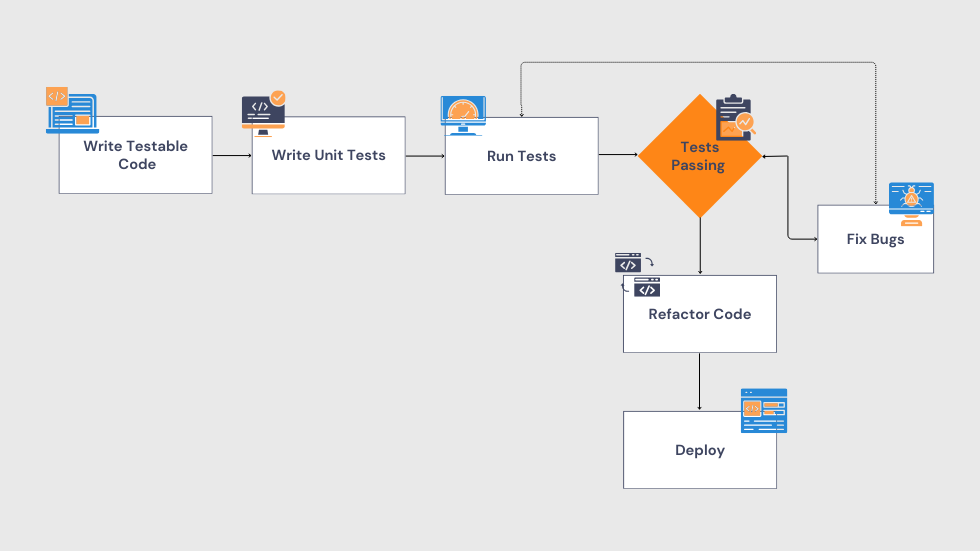
    To better understand how .NET Unit Testing fits into the development process, the diagram below illustrates a typical unit testing workflow in a .NET environment. It shows how developers write unit tests, execute them, validate the results, and address issues early before the code moves further in the pipeline. This structured .NET Unit Testing approach helps ensure consistent code quality, reduces risks, and enables smoother, more reliable releases.

    Conclusion

    .NET Unit Testing is a fundamental part of building reliable applications in the .NET ecosystem. By following proven best practices and using the right unit testing tools, developers can create applications that are not only robust but also easier to maintain and evolve over time.

    Investing time in writing effective .NET Unit Testing scenarios may seem like extra effort at first, but it pays off in the long run. Strong unit tests improve code quality, reduce bugs, and give teams the confidence to release changes faster and more safely making .NET Unit Testing a cornerstone of modern, future-ready .NET development.

    Latest Blog Highlights: https://embarkingonvoyage.com/blog/best-practices-for-error-handling-in-net-application-2026/

  • Best Practices for Error Handling in .Net Application 2026

    Best Practices for Error Handling in .Net Application 2026

    In 2026, applications are more distributed and complex than ever cloud-native platforms, microservices, Blazor apps, real-time updates, and always-on users are now the standard. In such environments, error handling in .NET applications is no longer optional; errors are not a question of if, but when. While failures are unavoidable, being unprepared when they happen shouldn’t be.

    This is where effective logging becomes critical. Good logs don’t just capture failures they provide context, trace the flow of execution, and help teams fix issues before users even notice. Poor logging, on the other hand, leads to longer debug cycles, unclear bug reports, and frustrated customers.

    In this blog, we’ll explore why logging matters in 2026, the most common logging pitfalls, and practical best practices with real ASP.NET Core and Blazor examples, so when something breaks in production, you have answers, not assumptions.

    Why Error Handling in .NET Applications Matters in 2026

    Here are the real problem isn’t the error itself it’s poor logging.

    When logs are unclear or incomplete, teams face:

    • Crashes that can’t be diagnosed
    • Vague or misleading bug reports
    • Longer debugging and fix cycles
    • Frustrated users and unhappy customers

    A real-world scenario:A user reports, The app is broken.

    You open the logs and see: Error occurred in process. In 2026, that’s not just unhelpful it’s unacceptable.

    Common Logging Mistakes That Cost Teams Time

    Basically, many applications log errors, but not all logging is useful. These are some of the most common pitfalls teams still face:

    • Missing stack traces: Without them, finding the root cause becomes a nightmare.
    • Logging sensitive information: Exposing passwords, tokens, or PII can lead to serious security and GDPR compliance issues.
    • No log level separation: When everything is logged the same way, critical issues get lost in noise.
    • Lack of user or request context: Without knowing who or what triggered the issue, debugging becomes slow and unreliable.
    • Excessive logging: Too many logs increase storage costs and overwhelm monitoring tools.

    Logging Best Practices for Modern Apps in 2026

    Effective logging in 2026 focuses on clarity, context, and control:

    • Prefer structured logging over plain text
    • Always include contextual data (User ID, Request ID, IP, Method)
    • Use proper log levels: Information, Warning, Error, Critical
    • Never log secrets tokens, passwords, or keys
    • Integrate with observability tools like, Serilog, Seq, ELK Stack, Azure Monitor, or App Insights

    Reference Link: https://learn.microsoft.com/en-us/dotnet/standard/exceptions/best-practices-for-exceptions

    ASP.NET Core Logging Example (Blazor-Ready)

    ASP.NET Core continues to make logging simple and scalable through dependency injection.

    Why this works in 2026

    • ILogger<T> is lightweight and cloud-friendly
    • Exceptions are logged with full context
    • Structured fields like {City} enable fast querying in log platforms

    Real-World Logging in a Blazor Server App (2026 Context)

    Blazor Server apps still depend heavily on SignalR and UI thread stability. Blocking or synchronous logging can degrade UX or break live connections.

    Advanced Logging with Serilog (2026-Ready)

    Smart Log Management Strategies for 2026

    Modern logging isn’t just about writing logs it’s about operating them intelligently:

    • Use correlation IDs to trace distributed requests
    • Enable automatic log rotation
    • Apply strict retention policies
    • Centralize logs using ElasticSearch or Azure App Insights
    • Set up alerts for critical and security-related events

     Conclusion 

    In 2026, error handling in .NET application is not just a backend concern it directly impacts reliability, performance, and user experience. As applications grow more complex and cloud-driven, clear exception handling and meaningful logging help teams understand what’s happening in production without guesswork. When errors are logged with the right context and structure, issues are resolved faster, systems stay stable, and users face fewer disruptions. Investing in better error handling in .NET application in 2026 ultimately leads to more resilient software and greater confidence when things don’t go as planned.

    Latest Blog Highlights: https://embarkingonvoyage.com/blog/agentic-ai-transforming-travel-fintech-retail-healthcare/