
Author: Manoj Birajdar

  • Clean Architecture in Blazor: How to Keep Your Code Scalable and Maintainable

    Clean Architecture in Blazor: How to Keep Your Code Scalable and Maintainable

    Many Blazor projects start off fast, delivering quick wins and rapid UI development. However, without a strong structural foundation, they can quickly devolve into what developers call a “spaghetti mess.”

    When your UI design, business logic, and database access code are all tightly coupled, the application becomes fragile. It is hard to fix, risky to update, and expensive to maintain.

    By implementing Clean Architecture in Blazor, you organize your application into clear, separate layers. The result is a professional, business-grade system that is simple to manage, easy to test, and ready to grow.

    The Problem: The “Everything Everywhere” Mess

    In the rush to deliver a project, it is tempting to take shortcuts. In many poorly structured Blazor applications, you see these common “anti-patterns”:

    1. Logic in the UI: Complex rules (like tax calculations or validations) are written directly inside the .razor visual components.
    2. Database Leaks: The UI layer talks directly to the database or external APIs, which is a significant security and maintenance risk.
    3. The Domino Effect: Changing one small detail in the database schema breaks the entire visual screen.

    For a business-grade application, this approach is unsustainable. Without a software design pattern, even small changes become risky and slow down the entire development team.

    The Solution: A Layered Architecture Plan (The Onion Model)

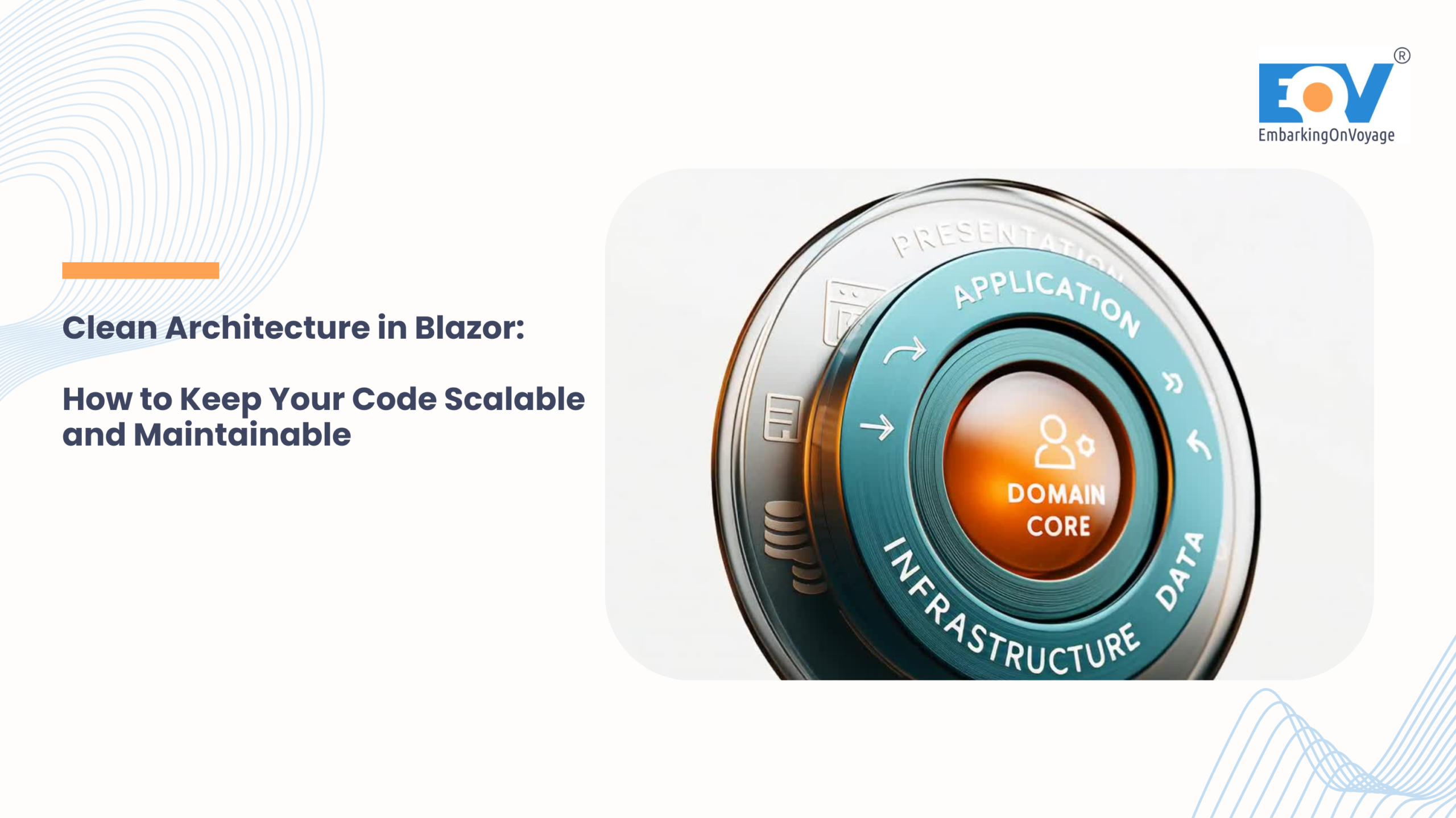
    Think of Clean Architecture like an onion. The most important “business brains” live in the center, highly protected from external changes.

    The fundamental rule of this architecture is dependency direction: Outer layers can talk to inner layers, but inner layers should never know about the outer layers.

    1. The Domain Layer (The Core Brains)

    This is the heart of your application where your basic, fundamental business rules live. For example, if you are building an e-commerce shop, the “Domain” layer defines entities like Product and Order. It knows that an order cannot have a negative price.

    Key Rule: This layer has zero dependencies. It doesn’t know about databases, UI frameworks (like Blazor), or the internet.

    2. The Application Layer (The Manager)

    This layer coordinates everything. If a user clicks a “Buy” button in the UI, this “Manager” layer receives the request, coordinates with the Domain layer to validate the business logic, and then tells the system where to save the data.

    • Why it helps: It keeps the “use cases” of your application in one centralized place, completely separate from the design implementation.

    3. The Infrastructure Layer (The Tools)

    This is where the actual connection to external systems happens.

    • What it does: It handles data persistence (saving to a SQL database via Entity Framework Core), sends emails, or connects to external third-party web services.
    • Benefit: If you decide to change your database provider or email service, you only need to modify the code in this single layer.

    4. The Presentation Layer (The Blazor Web Face)

    This is the actual Blazor WebAssembly or Blazor Server application that the user sees and interacts with.

    Key Rule: The UI is only for display. No heavy business thinking allowed! The UI should only display data and send user actions (clicks) to the Application layer.

    Why Clean Architecture is Better for Blazor

    FeatureMessy (Spaghetti) WayClean Architecture Way
    Fixing BugsLike finding a needle in a haystack.You know exactly which layer to check.
    Adding FeaturesHigh risk of breaking existing code.Safe, predictable, and modular development.
    TestingAlmost impossible to automate UI tests.Highly testable; the business brains are separated from the UI.

    Enhanced Security and Compliance

    Using distinct layers makes it significantly easier to adhere to security standards and regulations like GDPR or HIPAA.

    • Better Privacy: You can isolate sensitive data handling within the Infrastructure and Application layers, ensuring the UI (which can be vulnerable on the client side) never exposes unnecessary information.
    • Easy Audits: Since every action flows through the Application layer’s “use cases,” it is simple to implement central logging to track who performed what action.
    • Safety Barriers: You can implement security “guards” (authorization logic) at the entry points of your Application layers, ensuring only authorized users can trigger specific actions.

    The Bottom Line

    Implementing Clean Architecture in Blazor is like building your house on a solid foundation instead of on shifting sand.

    1. Keep things separate: Never let your visual design screens talk directly to your database.
    2. Protect your rules: Your core business logic should be the most stable and protected part of your code.
    3. Plan for the future: Build a system that is easy to change next year, not just functional today.

    Blog Highlights : https://embarkingonvoyage.com/how-ai-reasoning-systems-are-redefining-net-development-and-what-developers-must-do-next/

    External read : https://github.com/neozhu/CleanArchitectureWithBlazorServer

  • Blazor Server vs WebAssembly: 1 Essential Architecture Guide for 2026

    Blazor Server vs WebAssembly: 1 Essential Architecture Guide for 2026

    Introduction

    When architecting modern .NET applications, the technical debate of Blazor Server vs WebAssembly directly impacts infrastructure expenditure and user experience. To resolve this, architects must transition from rigid hosting models to dynamic, component-level render modes introduced in recent .NET frameworks. By strategically applying Blazor Server for initial load and Blazor WebAssembly (WASM) for steady-state interactivity, teams can drastically minimise cloud compute costs, eliminate interface latency, and maintain strict security boundaries.

    The Context / The Problem

    Why is this a challenge right now? Historically, choosing between Blazor Server and WebAssembly meant committing the entire application to a single hosting model. This created a rigid dichotomy. Blazor Server applications rely on a persistent SignalR websocket connection. While this keeps the initial payload small, real-world constraints—such as a user accessing a logistics portal on a highly unstable mobile network—cause the connection to drop, resulting in UI freezes.

    Conversely, forcing users to download a massive WebAssembly runtime for a simple data-entry form leads to unacceptable bounce rates. As enterprise applications scale to support thousands of concurrent users across Europe, the RAM required to maintain thousands of active server circuits drives up cloud hosting costs by thousands of Euros (€) annually. Relying on a single hosting model forces engineers to choose between high server costs or slow initial load times, ultimately compromising the business outcome.

    The Technical Deep-Dive / Architecture

    Understanding the Trade-Offs In 2026, the primary template is the Blazor Web App. This model allows engineers to mix and match how components are rendered based on objective performance requirements.

    1. Blazor Server (Server-Side Rendering) Blazor Server executes C# code entirely on the server, streaming DOM updates to the browser via SignalR.

    • The Strategic Advantage: First-paint speed is exceptional. It provides full, immediate access to server resources, and database connection strings remain safely behind the corporate firewall.
    • The Technical Constraint: It requires one active circuit in server memory per user. If a high-traffic public portal experiences a usage spike, server RAM consumption scales linearly, necessitating expensive infrastructure upgrades.

    2. Blazor WebAssembly (Client-Side Rendering) WebAssembly runs the .NET runtime directly within the user’s browser.

    • The Strategic Advantage: It offloads compute tasks to the client’s CPU. Once loaded, UI interactions are instantaneous, and it supports robust Progressive Web App (PWA) offline capabilities.
    • The Technical Constraint: The initial download size is significantly larger. Furthermore, because the code executes on the client, it cannot securely connect directly to a database; it demands a robust, secure API layer.

    The 2026 Comparison Matrix

    FeatureBlazor ServerBlazor WebAssembly
    Startup SpeedFastest (Minimal HTML payload)Slower (Downloads .NET runtime)
    Server LoadHigh (Maintains state per user)Low (Client CPU processes logic)
    Security BoundaryEasier (Code remains on server)Complex (Requires Zero-Trust APIs)
    Network RelianceHeavy (UI halts if connection drops)Moderate (Only fetches JSON data)
    Primary Use CaseInternal tools & Admin portalsHigh-scale, public-facing apps

    The “Golden Path”: Interactive Auto Render Mode

    The most pragmatic architecture for 2026 is the Auto Render Mode. This hybrid approach delivers the optimum balance of speed and scalability.

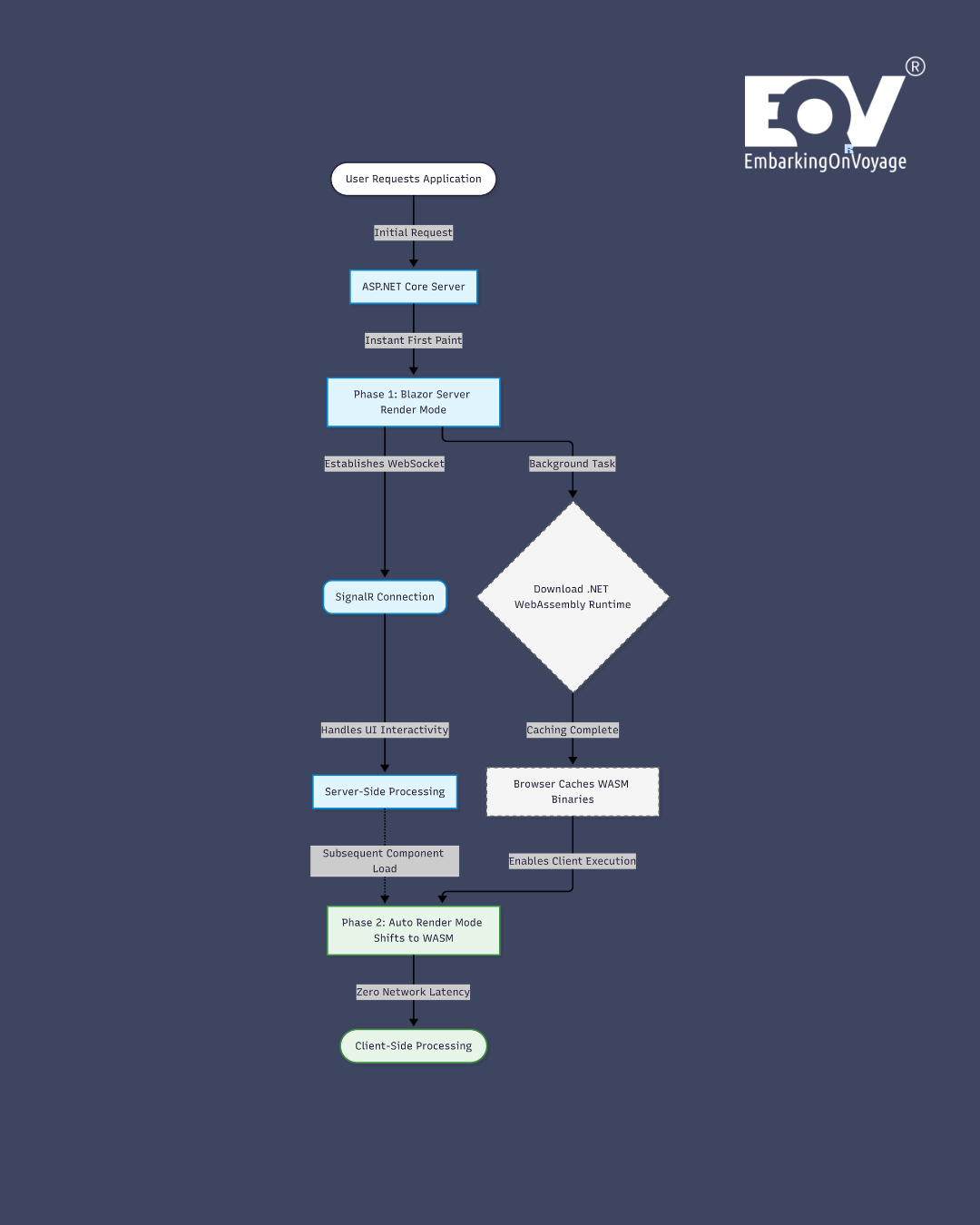
    When a user requests a page, the component is initially rendered via Blazor Server, providing an instant user interface. Concurrently, the WebAssembly runtime is silently downloaded in the background. On subsequent visits, the component executes entirely via WebAssembly, instantly freeing up server resources and eliminating network latency for UI interactions.

    Configuration Example: Below is the standard configuration in the Program.cs file required to enable these dual rendering modes securely.

    // Program.cs configuration for Blazor Web App
    var builder = WebApplication.CreateBuilder(args);
    
    // Register services for both Server and WebAssembly rendering
    builder.Services.AddRazorComponents()
        .AddInteractiveServerComponents()
        .AddInteractiveWebAssemblyComponents();
    
    var app = builder.Build();
    
    // Map components and enable the Auto Render mode fallback
    app.MapRazorComponents<App>()
        .AddInteractiveServerRenderMode()
        .AddInteractiveWebAssemblyRenderMode();
    
    app.Run();

    Note: Ensure your data access logic is properly abstracted into interfaces, as WebAssembly components must call an API rather than accessing the database directly.

    Blazor Auto Render Mode

    Security & Compliance Considerations

    Zero-Trust and European Data Privacy When transitioning components from Blazor Server to WebAssembly, the security perimeter fundamentally shifts. Because Blazor Server executes within your protected network, it is inherently easier to secure. WebAssembly, however, downloads DLL files directly into the user’s browser.

    Engineers must adopt a Zero-Trust security posture. You must never hardcode secrets, API keys, or proprietary business logic into a WebAssembly component, as any user can inspect the payload via browser developer tools.

    To maintain GDPR compliance and enforce Tech Sovereignty, all data retrieval in WebAssembly must route through secured, authenticated web APIs. Teams must implement explicit Data Lineage tracking to ensure that PII (Personally Identifiable Information) fetched by the client-side WebAssembly app is encrypted in transit, never cached locally without consent, and strictly confined to designated European cloud regions.

    The Bottom Line

    • Design for component-level rendering: Stop treating your application as a monolith; use Blazor Server for instant loading on static pages and WebAssembly for heavy, interactive client-side components.
    • Implement Auto Render Mode: Utilise the hybrid approach to achieve immediate first-paint speeds while offloading steady-state processing to the client’s CPU, saving thousands in server costs.
    • Enforce Zero-Trust via APIs: Treat all WebAssembly code as public domain, securing all data access behind strict APIs to guarantee GDPR compliance and data privacy.

    Transitioning from legacy monoliths to highly optimised, hybrid .NET architectures requires precise engineering and rigorous security standards. EmbarkingOnVoyage builds these scalable Blazor solutions for enterprise partners, ensuring your digital products deliver peak performance, absolute compliance, and tangible business growth.

    Latest Blog Highlight : https://embarkingonvoyage.com/blog/building-voice-user-interfaces-3-essential-steps-to-lower-latency/

    References:

    Microsoft Learn – Blazor Render Modes: https://learn.microsoft.com/en-us/aspnet/core/blazor/components/render-modes 

    Microsoft Learn – Blazor Hosting Models: https://learn.microsoft.com/en-us/aspnet/core/blazor/hosting-models 

  • Blazor Server Production Checklist

    Blazor Server Production Checklist

    Getting your Blazor Server app to run on localhost is easy. Keeping it stable in production? That’s where the real challenge begins. 

    Many teams experience this: everything works perfectly during development, tests pass, and deployment feels smooth, until real users start interacting with the app. Suddenly, you see lag, unexpected “connection lost” messages, or slow UI responses that never showed up before. 

    In 2026, building a production-ready Blazor Server app isn’t just about writing clean code. It’s about managing SignalR connections, server memory, and real-time user interactions at a scale. 

    This checklist is designed to help you launch confidently, with performance, stability, and scalability in mind. 

    Before going live, make sure your environment is truly production-ready not just “working.” 

    • Set Environment Properly 
      Always set ASPNETCORE_ENVIRONMENT to Production. Missing this can expose sensitive debug data. 
    • Secure Your Secrets 
      Never store API keys or connection strings in appsettings.json. Use secure tools like Azure Key Vault or environment variables. 
    • User-Friendly Error Handling 
      Replace technical error pages with a clean, branded UI. Log the actual errors internally so your team can debug without exposing details to users. 

    Pro Tip: A polished error experience builds trust, even when something goes wrong. 

    SignalR is the backbone of every Blazor Server app. If the connection drops, the user experience breaks instantly. 

    • Enable WebSockets 
      Ensure your hosting provider supports WebSockets. Falling back to long polling increases latency and server load. 
    • Use Sticky Sessions (Session Affinity) 
      If you’re not using Azure SignalR Service, this is mandatory in load-balanced environments. 
    • Scale with Azure SignalR Service 
      For apps expecting 100+ concurrent users, offload connection management to Azure SignalR. 

    Reality Check: Most “random disconnect” issues come from poor SignalR configuration, not your code. 

    Blazor Server apps consume server memory per user. Think of it like each user renting space on your server. 

    • Keep ViewModels Lightweight 
      Only load the data needed for the UI. Avoid loading full database objects unnecessarily. 
    • Clean Up Resources 
      Components using timers or events must implement IDisposable to prevent memory leaks. 
    • Use Virtualization 
      For lists larger than 50 items, use <Virtualize> to reduce rendering load. 

    Golden Rule: Less data + fewer UI elements = faster app + lower memory usage. 

    Before you hit deploy, run through this quick validation list: 

    Once your app is live, monitoring becomes your safety net. 

    • Track Circuit Count 
      Sudden spikes may indicate bot traffic; gradual increases may signal memory leaks.  
    • Monitor SignalR Disconnects 
      Frequent reconnect attempts usually point to network or infrastructure issues.  
    • Use Structured Logging 
      Tools like Serilog to help you trace issues using identifiers like CircuitId.  

    Think of monitoring your early warning system. 

    A strong Blazor Server production checklist ensures your Blazor Server application performs reliably beyond development. Real-world usage brings challenges like connection drops, memory pressure, and scaling issues. By focusing on Blazor Server performance optimization, stable SignalR connections, and a well-planned Blazor Server deployment strategy, you can deliver a seamless user experience. 

    Continuous monitoring and improvements are key to maintaining stability. In the end, success isn’t just about launching it’s about building a Blazor Server app that scales efficiently and performs consistently for every user. 

    References 

    Latest Blog Highlights: https://embarkingonvoyage.com/blog/designing-and-implementing-microsoft-azure-networking-solutions/

  • How to implement validation in Blazor Server

    How to implement validation in Blazor Server

    In today’s web applications, forms are where users interact the most and where things can go wrong the fastest. A missing validation rule can lead to bad data, frustrated users, or even serious security issues. That’s why validation isn’t just a technical requirement; it’s a core part of building reliable and user-friendly applications.

    When working with Validation in Blazor Server goes a step further. Because the app relies on a constant connection between the client and the server, even small validation mistakes can impact performance and user experience. From simple required fields to advanced async checks like database-driven email validation, getting validation right makes your application feel fast, trustworthy, and professional.

    In this blog, we’ll explore how Blazor Server handles validation, common mistakes developers run into, real-world scenarios, and best practices to build robust, scalable validation that works seamlessly in production environments.

    Built-in Validation in Blazor Server 

    Blazor Server provides a robust validation framework out of the box. It is primarily based on Data Annotations and works seamlessly with form components.

    The key building blocks include:

    • EditForm – wraps your form and manages validation
    • DataAnnotationsValidator – enables attribute-based validation
    • ValidationSummary – displays all validation errors
    • ValidationMessage – shows field-specific error messages

    Example: A Basic Blazor Form with Validation

    Common Pitfalls of Validation in Blazor Server  (and How to Fix Them)

    Even with Blazor’s built-in tools, developers often run into unexpected validation issues. Here are some of the most common ones and how to solve them.

    • Validation Not Triggering for Dynamically Loaded Data: This usually happens when data is updated after the component has already rendered.

    Solution: Manually use EditContext and call NotifyValidationStateChanged() when the model changes.

    • Validation Not Working Inside Child Components: Blazor does not automatically pass validation context to child components.

    Solution: Explicitly pass the EditContext to child components using parameters or cascading values.

    • Custom Validation Messages Not Showing: This often occurs when ValidationMessage or DataAnnotationsValidator is missing or incorrectly configured.

    Solution: Ensure:

    • DataAnnotationsValidator is present inside the EditForm
    • ValidationMessage is bound to the correct field
    • Laggy User Experience Due to Server-Only Validation: Since Blazor Server relies on SignalR, excessive server calls during validation can slow down the UI.

    Solution: Optimize validation logic and avoid unnecessary server round-trips, especially on every keystroke.

    Real-World Scenario: Email Uniqueness Check from DB (Async)

    A very common real-world requirement is checking whether an email already exists in the database before allowing form submission.

    Below is a simplified example of async custom validation using EditContext and ValidationMessageStore.

    Blazor Server vs Blazor WebAssembly: Validation Differences

    While validation concepts are similar, execution differs significantly between Blazor Server and WebAssembly.

    Why This Matters

    Even if validation runs on the client, server-side validation should never be skipped, especially for security-critical applications.

    Advanced Validation Techniques in Blazor Server

    As applications grow, simple Data Annotations may not be enough. Here are some advanced approaches:

    • FluentValidation for complex business rules
    • Cascading EditContext for reusable form components
    • Localized validation messages for multi-language applications
    • Custom validation attributes for domain-specific logic

    These techniques help keep validation logic clean, maintainable, and scalable.

    How Proper Validation Solves Real-World Problems

    In enterprise applications like HR systems, finance portals, or e-commerce platforms, validation failures can break entire workflows.

    For example:

    • A missing email uniqueness check can cause failed user provisioning
    • Invalid form data can lead to downstream processing errors
    • Poor validation feedback increases support tickets and user frustration

    Strong validation ensures data consistency, smoother workflows, and fewer production issues.

    Best Practices for validation in Blazor Server

    To wrap it up, here are some proven best practices:

    • Always include DataAnnotationsValidator and ValidationMessage
    • Use EditContext for advanced and manual validation scenarios
    • Minimize unnecessary server calls to improve UX
    • Validate data on both client and server sides
    • Unit test validation logic wherever possible

    Conclusion

    Validation in Blazor Server isn’t just about stopping bad input it’s about creating forms that feel responsive, intuitive, and reliable. From simple Data Annotations to advanced async checks like email uniqueness, the right validation strategy can save hours of debugging and prevent costly production issues. When validation is thoughtfully designed, your Blazor applications become easier to maintain, more secure, and far more user-friendly.

    Latest Blog Highlights: https://embarkingonvoyage.com/blog/building-serverless-applications-with-azure-functions-and-net/

  • Exception Lifecycle in Blazor Server Application

    Exception Lifecycle in Blazor Server Application

    Introduction

    In today’s web applications, things will go wrong network calls fail, APIs time out, and users click faster than we expect. What separates a good application from a great one is how gracefully it handles these failures throughout the Exception Lifecycle in Blazor Server Application. Strong error handling is no longer just a technical requirement; it’s essential for delivering a smooth and trustworthy user experience.

    Blazor Server adds an interesting twist to this challenge. Because it relies on a persistent SignalR connection between the browser and the server, even a single unhandled exception can do more than break a feature it can disrupt the entire user session. At the same time, this architecture gives us powerful tools to detect, manage, and recover from errors more intelligently.

    In this blog, we’ll walk through the Exception Lifecycle in Blazor Server Application , uncover common pitfalls developers face, and share practical, real-world strategies to handle errors without breaking the user experience. The goal is simple: build Blazor apps that stay stable, transparent, and reliable even when things don’t go as planned.

    Understanding the Exception Lifecycle in Blazor Server Application

    What Does “Exception Lifecycle” Really Mean?

    In a Blazor Server application, exceptions don’t always show up where you expect them. An error might start from a simple button click in the UI, but it usually travels deep into your application through components, services, and APIs before it finally surfaces.

    Exceptions can occur at multiple points:

    • Client-side interactions, such as UI events or component rendering issues
    • Server-side operations, including database queries, API calls, or background services

    Because Blazor Server relies on a persistent SignalR connection, every user interaction is processed on the server. This means unhandled exceptions aren’t just local errors they can break the user’s circuit if they’re not handled properly. That’s why catching, logging, and reporting exceptions on the server side is critical.

    A Typical Lifecycle Flow

    Here’s how an exception usually flows through a Blazor Server application:

    User Action ➜ Event Handler ➜ Component Logic ➜ Service Layer ➜ Database / External API ➜ Exception Occurs ➜ Logging & Monitoring ➜ User-Friendly Feedback

    Understanding this flow helps you identify where to intercept errors, how to prevent SignalR disconnects, and how to give users meaningful feedback instead of a broken screen or forced refresh.

    Common Technical Pitfalls

    Pitfall 1: Not Catching Exceptions in Async Methods

    This is one of the most common and most dangerous mistakes in Blazor Server applications. Because nearly everything runs asynchronously, an unhandled exception inside an async method can instantly break the SignalR circuit and leave users staring at a frozen screen.

    Problem:Unprotected async calls allow exceptions to bubble up and crash the app.

    At runtime, this can:

    • Disconnect the user session
    • Force page refresh
    • Provide no useful error feedback

    Solution: Always handle async calls with try-catch.

    Handled exceptions keep the connection stable, improve debugging, and deliver a better user experience.

    Pitfall 2: The UI Doesn’t Recover Gracefully

    One of the most frustrating user experiences is when something goes wrong and the screen simply breaks. In Blazor Server apps, a single component error can stop the UI from rendering and confuse users. Instead of crashing silently, the UI should acknowledge the issue and recover gracefully.

    The Fix: Guard Your Rendering Logic

    By wrapping your component with a simple error check, you can show a clear message when something goes wrong without breaking the entire page.

    This approach keeps the UI stable, provides meaningful feedback, and prevents the entire page from failing.

    Pitfall 3: Missing Centralized Error Handling

    When every component handles errors on its own, things quickly become messy and inconsistent. Some errors show messages, others crash silently, and debugging turns into guesswork. Without a central approach, even small issues can ripple across the UI.

    The Fix: Use ErrorBoundary (.NET 7+)

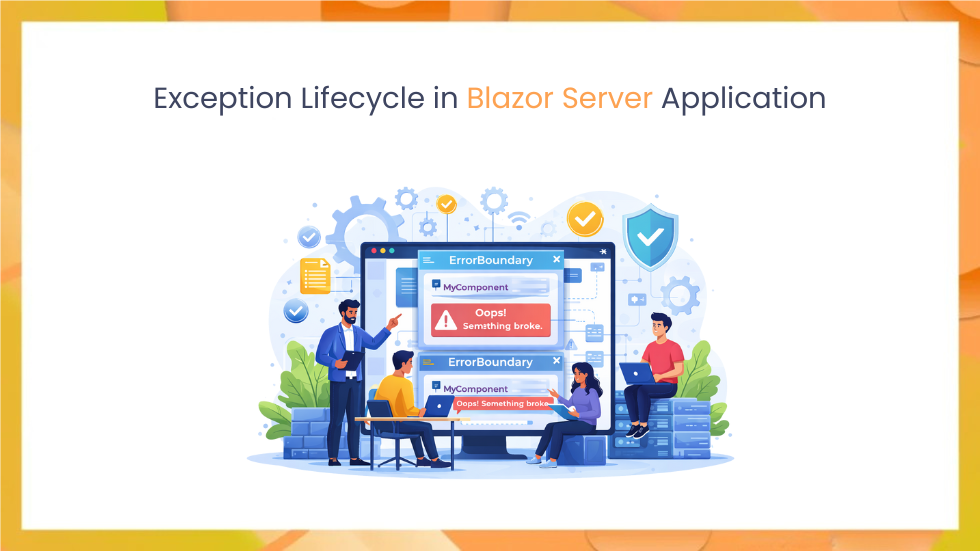
    Blazor’s ErrorBoundary lets you catch rendering errors at the component level and show a safe fallback UI instead of breaking the page.

    This keeps failures contained, the UI stable, and users informed without taking down the entire application.

    Real-World Problem: When Unhandled Exceptions Kill the SignalR Connection

    In Blazor Server, an unhandled exception doesn’t just break a feature—it can break the entire user session. A single failed action can crash the SignalR connection, forcing users to refresh the page and potentially lose their work.

    In business-critical applications, this quickly leads to frustration, lost data, and a loss of user trust.

    The Solution: Track and Monitor with CircuitHandler

    Blazor provides CircuitHandler to help you monitor the lifecycle of a user’s connection. By logging circuit events, you gain visibility into unexpected disconnects and can diagnose issues before users complain.

    Above code will help you to understand when, why, and how often user sessions are unexpectedly terminated.

    Best Practices for Exception Management

    To build resilient Exception Lifecycle in Blazor Server applications, keep these principles in mind:

    • Always wrap async calls in try-catch
    • Show clear, user-friendly error messages
    • Log exceptions using structured logging
    • Use ErrorBoundary to isolate UI failures
    • Create reusable error-handling services
    • Monitor circuit disconnections with CircuitHandler

    These practices prevent small issues from becoming major outages.

    Advanced Scenario: Retrying Failed Operations Gracefully

    Not every failure needs to be final. Temporary issues like network glitches or API hiccups can often be resolved by retrying the operation.

    This approach improves reliability while keeping failures transparent and well-logged.

    Conclusion

    Understanding the Exception Lifecycle in Blazor Server applications is essential for building stable and reliable apps. Since every interaction runs through SignalR, even small unhandled exceptions can disrupt the user experience.

    By handling errors proactively with tools like try-catch, ErrorBoundary, and CircuitHandler, you can control the exception lifecycle and ensure your Blazor Server application stays resilienteven when failures occur.

    Latest Blog Highlights: https://embarkingonvoyage.com/blog/monolith-vs-microservices-the-2026-roadmap-for-tech-leaders/

  • Why Logging Matters in 2025: Best Practices for Blazor & ASP.NET Core

    Why Logging Matters in 2025: Best Practices for Blazor & ASP.NET Core

    Introduction

    Hello! In this blog, I’ll be sharing my experiences with logging in modern applications.

    In 2025, building apps has become more complex than ever, from cloud-native microservices to interactive Best Practices for Blazor & ASP.NET Core. With this complexity, errors are can’t be avoided. But here’s the catch: without proper logging, even small issues can turn into hours of debugging, frustrated users, and stressful production headaches.

    Through my experience, I’ve learned that good logging is not just a technical requirement but, also it’s a lifesaver during incidents. In this blog, I’ll cover why logging matters, common pitfalls to avoid, and actionable Best Practices for Blazor & ASP.NET Core that help you maintain reliable, user-friendly applications. Whether you’re just starting out or have years of experience, these tips will help you log smarter, not just more.

    Why Logging Matters in 2025

    Basically, Errors happen that’s a fact. But poor logging can make diagnosing them a nightmare. Common consequences include:

    • Undiagnosed crashes
    • Confusing bug reports
    • Longer debug cycles
    • Frustrated users

    Here, Real World Problem:

    Imagine a user reports, “The app isn’t working.” You check the log and see:

    “Error occurred in process. This tells you nothing.”

     Common Logging Pitfalls

    Here, many developers unintentionally make logging mistakes that cause bigger problems. To improve your logs and avoid common pitfalls, keep these tips in mind:

    • No stack trace: Makes it difficult to find the root cause.
    • Logging sensitive data: Can cause security and GDPR issues.
    • No log level differentiation: All logs look the same, making it hard to filter and prioritize.
    • No request/user context: Makes tracking specific user issues tricky.
    • Too much logging: Creates noise and increases storage costs.

    Avoiding these mistakes early will save you time, effort, and frustration later.

    Best Practices for Logging in .Net 2025

    Moving on to Step 3: how to log the right way:

    • Firstly, use structured logging for easier querying.
    • Include contextual information: user ID, IP, method name.
    • Apply log levels: Information, Warning, Error, Critical.
    • Avoid logging secrets like passwords or tokens.
    • Integrate with tools like Serilog, Seq, ELK, or Azure Monitor.

    Example: Basic Logging in ASP.NET Core (Blazor-Compatible)

    In Blazor Server, logging must be handled carefully to avoid blocking SignalR connections.

    Why it works:

    • ILogger<T> injects a logging service.
    • LogError captures the exception and message.
    • {City} enables structured logging, making it easy to query later.

    Logging in a Blazor Server App

    In Blazor Server apps require careful logging. Logging on the UI thread without async handling can block rendering or crash SignalR connections.

    Advanced Tip: Integrating Serilog (Optional Advanced) 

    Serilog makes your logging more powerful compared to the default .NET logger. It gives you structured logs, better formatting, and the ability to send logs anywhere the files, Seq, Elasticsearch, or cloud monitoring tools.

    Tips for Better Log Management in Best Practices for Blazor & ASP.NET Core

    • Use correlation IDs per request.
    • Rotate logs automatically (daily/size-based).
    • Set retention policies to save storage.
    • Centralize logs using ElasticSearch or Azure App Insights.
    • Add alerts for critical failures to react quickly.

    Conclusion

    Better logging isn’t just a technical detail it’s a lifeline when production issues hit. When something goes wrong in a live environment, meaningful logs can be the difference between a quick fix and hours of painful debugging.

    By following the Best Practices for Blazor & ASP.NET Core, you can build applications that are easier to maintain, faster to troubleshoot, and more reliable for your users. Structured, clear, and contextual logging helps you understand issues instantly and reduce downtime.

    Start small, log smart, and make your 2025 applications resilient from day one. Your future self and your users will thank you.

    Latest Blog Highlights: https://embarkingonvoyage.com/blog/are-you-ready-to-co-partner-for-product-development-and-modernisation/