



In today’s cloud-first world, Azure networking is far more than just connectivity, it’s the foundation of your entire security posture. Whether you’re building multi-tier applications, migrating enterprise workloads, or preparing for the AZ-700 Microsoft Azure Network Engineer certification, understanding how to design, implement, and secure Azure Virtual Networks (VNet) is a critical skill. This guide walks cloud engineers through a production-ready approach to designing and implementing Microsoft Azure networking solutions.
Core Azure Networking Components
Before diving into architecture patterns, let’s establish a solid understanding of the core building blocks used when designing Azure networking solutions.
Azure Virtual Network
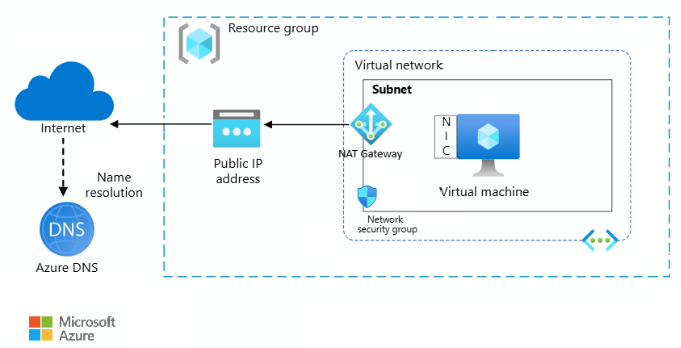
An Azure Virtual Network (VNet) is the fundamental building block of your private network in Azure. It enables secure communication between Azure resources, the public internet, and on-premises infrastructure. VNets are region-scoped and support custom IP address ranges using CIDR notation. Every enterprise Azure architecture begins with deliberate VNet design, choosing the right address space, planning for VNet peering, and considering hybrid connectivity via Azure VPN Gateway or Azure ExpressRoute.
Segmentation for Security and Control
Subnets allow you to logically divide a VNet into isolated segments. This segmentation is critical for network isolation in Azure, applying granular security controls, and optimizing traffic flow. A well-designed subnet strategy prevents lateral movement of threats and supports compliance requirements such as PCI-DSS and SOC 2.
| Tier | Subnet Range | Purpose |
| Web Tier | 10.0.1.0/24 | Public-facing load balancers, Application Gateway |
| Application Tier | 10.0.2.0/24 | Backend API services, microservices, app logic |
| Database Tier | 10.0.3.0/24 | SQL, Cosmos DB, Redis Cache, no public access |
| Management Subnet | 10.0.4.0/27 | Azure Bastion, jump hosts, monitoring agents |
Stateful Traffic Filtering at Scale
Azure Network Security Groups (NSGs) act as stateful, distributed firewalls that control inbound and outbound traffic at the subnet or NIC level. Each NSG consists of security rules prioritized by a number, lower numbers are evaluated first. NSGs are a cornerstone of any Azure network security implementation and should be applied consistently as part of your landing zone design.
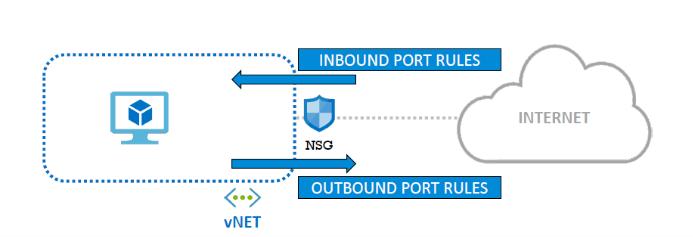
- Rules are evaluated by priority, lowest number wins (100–4096 range)
- Allow or Deny based on source/destination IP, port, and protocol
- Can be applied at both the subnet level and individual NIC level
- Augmented security rules support service tags (e.g., AzureMonitor, Storage)
- NSG Flow Logs integrate with Azure Monitor and Microsoft Sentinel for SIEM
Zero Public Exposure for PaaS Services
Azure Private Endpoints allow you to access PaaS services, such as Azure Storage, Azure SQL Database, Azure Key Vault, and Azure Service Bus, via a private IP address within your VNet. This eliminates exposure to the public internet and is one of the most impactful controls available for securing Azure cloud infrastructure.
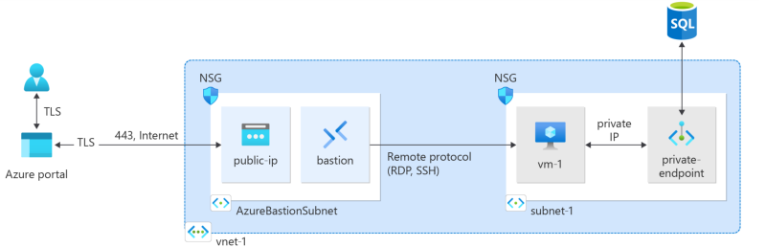
- No public IP required, traffic flows entirely within the Azure backbone
- Works with Azure Private DNS Zones for seamless name resolution
- Supported for 60+ Azure services including Blob Storage and Cosmos DB
- Critical for meeting enterprise compliance and data sovereignty requirements
Reference Architecture for Production Azure Deployments
A production-grade, secure Azure network architecture typically combines all the components above into a cohesive, defense-in-depth design. This pattern is aligned with the Microsoft Azure Well-Architected Framework and supports Zero Trust principles.
- VNet with multiple subnets (Web, App, DB, Mgmt)
- NSGs applied at every subnet boundary
- Azure Bastion for secure VM access (no public SSH/RDP)
- Private Endpoints for all PaaS services
- Azure Firewall for centralized egress control
- Azure DDoS Protection Standard enabled
- VNet Peering or Azure Virtual WAN for hub-spoke
- Azure Monitor + Log Analytics for observability
Azure Networking Security Best Practices
Applying the right security controls from the start prevents costly rework. These are field-tested best practices for any Azure cloud network architecture:
1. Apply the Principle of Least Privilege
Only open the ports and protocols genuinely required for your workloads. Avoid wildcard “Allow Any” NSG rules. Each rule should have a documented business justification. Use Azure Policy to enforce NSG compliance at scale across subscriptions.
2. Eliminate Public IP Addresses
Wherever possible, remove public IPs from compute resources. Use Azure Bastion for administrative access, Private Endpoints for PaaS connectivity, and Azure Application Gateway with WAF as the only public-facing ingress point for web workloads.
3. Layer NSGs with Azure Firewall
NSGs provide micro-segmentation at the subnet and NIC level, while Azure Firewall provides centralized, policy-driven egress control with FQDN filtering, threat intelligence, and TLS inspection. Used together, they implement a layered defense-in-depth model aligned with NIST and CIS Azure Benchmark recommendations.
4. Enable Comprehensive Logging and Monitoring
Enable NSG Flow Logs and send them to a Log Analytics workspace. Use Azure Network Watcher for packet capture, connection troubleshooting, and topology visualization. Connect logs to Microsoft Sentinel for advanced threat detection, correlation rules, and automated incident response.
5. Implement Zero Trust Network Architecture
Modern Azure network design is built on Zero Trust principles: verify explicitly, assume breach, and minimize blast radius. Micro-segment workloads, enforce MFA at identity boundaries, and treat every network segment as potentially hostile. Combine NSGs, Azure Firewall, Microsoft Entra ID (formerly Azure AD), and Conditional Access to build a complete Zero Trust network posture.
Common Azure Networking Mistakes to Avoid
Many cloud teams introduce security gaps through configuration oversights. These are the most frequently seen issues in Azure networking reviews:
- Placing all resources in a single flat subnet with no segmentation
- Leaving ports 22 (SSH) and 3389 (RDP) open to the internet
- Not using Private Endpoints for databases and storage accounts
- Ignoring NSG rule priority conflicts that silently override intended policy
- Deploying Azure resources without an associated NSG
- Missing NSG Flow Logs, no visibility into traffic patterns or anomalies
Real-World Impact of Proper Azure Network Design
Teams that implement the above architecture patterns consistently report measurable improvements in both security posture and operational efficiency
🔒 Significantly reduced attack surface
📊 Full traffic visibility and audit trails
✅ Enterprise and regulatory compliance alignment
⚡ Controlled, predictable internal traffic flows
🛡 Zero Trust posture across all workloads
💡Faster incident detection and response
Key Takeaways
- Azure networking is a security architecture discipline, not just plumbing
- Subnet segmentation + NSG rules = a strong, enforceable defense layer
- Private Endpoints are non-negotiable for production PaaS workloads
- Azure Bastion replaces public SSH/RDP, remove those inbound rules
- Hub-and-spoke topology scales for enterprise Azure Landing Zone designs
- Zero Trust and least-privilege networking reduce blast radius significantly
- These concepts directly map to the AZ-700 and AZ-104 certification exams
Conclusion
A well-architected Azure Networking is the backbone of every secure, scalable cloud solution. By combining Virtual Network design, subnet segmentation, NSGs, Private Endpoints, and Azure Firewall into a cohesive architecture, you can build infrastructure that is secure by default, observable end-to-end, and aligned with both enterprise standards and Microsoft’s Azure Well-Architected Framework. Getting the network right from the start is always faster, and cheaper, than retrofitting security later.
References Link: https://learn.microsoft.com/en-us/azure/networking/security/
Latest Blog Highlights: https://embarkingonvoyage.com/blog/react-roadmap-2026-skills-that-matter-most/
Leave a Reply