




Introduction
.Net Unit testing plays a key role in building reliable software by making sure each part of your application works exactly as expected. In the .NET ecosystem, having the right unit testing practices and tools can make a huge difference is not just in catching bugs early, but in writing cleaner, more maintainable code.
In this blog, we’ll look at why .NET Unit Testing is a must-have practice for 2026-ready .NET applications. With cloud-native architectures and continuous deployments becoming the norm, automated unit testing is no longer a best practice it’s a necessity.
What is Unit Testing?
Unit testing consists of testing components or functions within a software application in isolation. The main aim is to ensure that the expected functionality of each unit of the software is verified for defect detection early in the development stages.
Benefits of .NET Unit Testing
- Early Bug Detect: Resolve bugs before they cause bigger issues.
- Refactoring Confidence: Could change the code, confident that unit tests will catch problems and unintended side effects.
- Documentation: This gives the specification of how each component will work.
- Facilitates Integration: Makes certain that system elements are functioning properly before integrating them into larger systems.
Best Practices for .Net Unit Testing
Writing Testable Code
- Single Responsibility Principle: Each class or method should have only one responsibility. It also makes testing easier.
- Dependency Injection: Dependency injection should be used for managing dependencies, and it should be made easier to replace implementations for testing.
Use Meaningful Test Names
- Use descriptive names for your test methods that indicate what functionality is being tested. For example, (CalculateTotal_ShouldReturnCorrectSum_WhenGivenValidInputs.)
Keep Tests Independent
- Each unit test should work on its own and not depend on the outcome of other tests. Every test must create its own setup, execute in isolation, and clean up any data or state it uses. This approach makes tests more reliable, easier to maintain, and simpler to debug when something goes wrong.
Test Edge Cases
- Don’t limit your tests to only the expected or “happy path” scenarios. Make sure to also cover edge cases and error conditions that could occur in real-world usage. Testing these scenarios helps uncover hidden issues early and ensures your application remains robust, stable, and reliable under all conditions.
Mock External Dependencies
- To keep unit tests focused and reliable, use mocking frameworks to simulate external dependencies such as databases, APIs, or third-party services. This allows you to isolate the unit being tested and ensures that test results are not affected by external systems.
Aim for High Code Coverage
- Aiming for a high level of coverage helps guarantee that the majority of your application logic is tested, even though reaching 100% code coverage isn’t always feasible or required. High code coverage lowers the possibility of unforeseen problems in production and boosts confidence in your code.
Popular Tools for .Net Unit Testing
Basically, choosing the right tools can make .NET unit testing more simpler, faster, and more effective. Below are some of the most widely used frameworks and libraries that help developers write reliable and maintainable unit tests.
1. MSTest
Overview:
MSTest is the default unit testing framework for .NET and comes with seamless integration into Visual Studio, making it a natural choice for many .NET developers.
Key Features:
- Easy to set up and use
- Built-in support for data-driven tests
- Tight integration with Visual Studio tools
2. NUnit
Overview:
NUnit is a popular open-source unit testing framework that has been widely adopted across the .NET community.
Key Features:
- Rich set of assertions and test attributes
- Strong support for parameterized tests
- Flexible and extensible for complex testing scenarios
3. xUnit
Overview:
xUnit is a modern unit testing framework designed with flexibility and extensibility in mind, often preferred for newer .NET projects.
Key Features:
- Supports parallel test execution for faster test runs
- Built-in support for dependency injection
- Encourages clean and maintainable test design
4. Moq
Overview:
Moq is one of the most popular mocking frameworks for .NET, used to simulate external dependencies during unit testing.
Key Features:
- Simple and intuitive API for creating mock objects
- Supports behavior verification
- Helps isolate the unit being tested from external systems
5. Fluent Assertions
Overview:
FluentAssertions is a library that improves test readability by allowing assertions to be written in a more natural, human-readable way.
Key Features:
- Fluent and expressive assertion syntax
- Makes test results easier to understand
- Improves maintainability of test code
Understanding the .NET Unit Testing Workflow
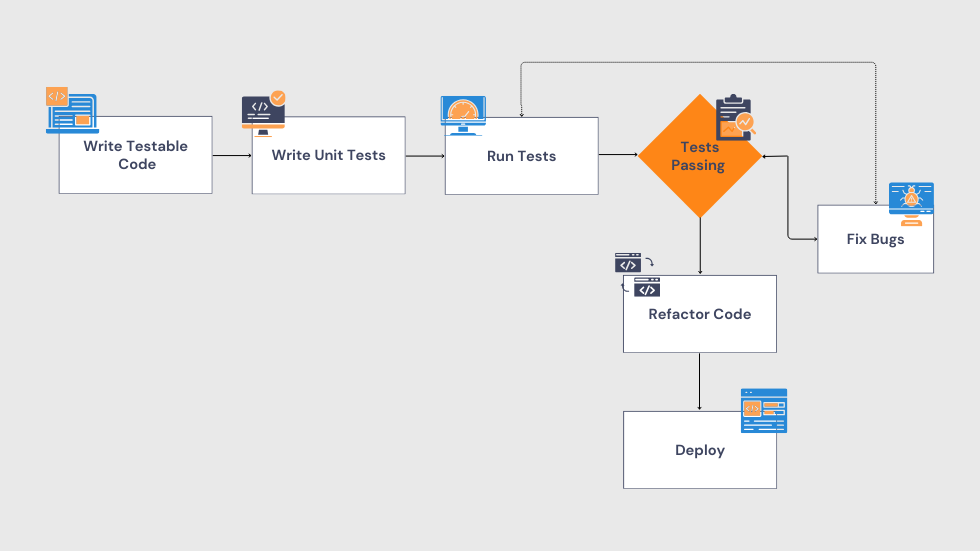
To better understand how .NET Unit Testing fits into the development process, the diagram below illustrates a typical unit testing workflow in a .NET environment. It shows how developers write unit tests, execute them, validate the results, and address issues early before the code moves further in the pipeline. This structured .NET Unit Testing approach helps ensure consistent code quality, reduces risks, and enables smoother, more reliable releases.
Conclusion
.NET Unit Testing is a fundamental part of building reliable applications in the .NET ecosystem. By following proven best practices and using the right unit testing tools, developers can create applications that are not only robust but also easier to maintain and evolve over time.
Investing time in writing effective .NET Unit Testing scenarios may seem like extra effort at first, but it pays off in the long run. Strong unit tests improve code quality, reduce bugs, and give teams the confidence to release changes faster and more safely making .NET Unit Testing a cornerstone of modern, future-ready .NET development.
Latest Blog Highlights: https://embarkingonvoyage.com/blog/best-practices-for-error-handling-in-net-application-2026/
Leave a Reply