



Introduction
When architecting modern .NET applications, the technical debate of Blazor Server vs WebAssembly directly impacts infrastructure expenditure and user experience. To resolve this, architects must transition from rigid hosting models to dynamic, component-level render modes introduced in recent .NET frameworks. By strategically applying Blazor Server for initial load and Blazor WebAssembly (WASM) for steady-state interactivity, teams can drastically minimise cloud compute costs, eliminate interface latency, and maintain strict security boundaries.
The Context / The Problem
Why is this a challenge right now? Historically, choosing between Blazor Server and WebAssembly meant committing the entire application to a single hosting model. This created a rigid dichotomy. Blazor Server applications rely on a persistent SignalR websocket connection. While this keeps the initial payload small, real-world constraints—such as a user accessing a logistics portal on a highly unstable mobile network—cause the connection to drop, resulting in UI freezes.
Conversely, forcing users to download a massive WebAssembly runtime for a simple data-entry form leads to unacceptable bounce rates. As enterprise applications scale to support thousands of concurrent users across Europe, the RAM required to maintain thousands of active server circuits drives up cloud hosting costs by thousands of Euros (€) annually. Relying on a single hosting model forces engineers to choose between high server costs or slow initial load times, ultimately compromising the business outcome.
The Technical Deep-Dive / Architecture
Understanding the Trade-Offs In 2026, the primary template is the Blazor Web App. This model allows engineers to mix and match how components are rendered based on objective performance requirements.
1. Blazor Server (Server-Side Rendering) Blazor Server executes C# code entirely on the server, streaming DOM updates to the browser via SignalR.
- The Strategic Advantage: First-paint speed is exceptional. It provides full, immediate access to server resources, and database connection strings remain safely behind the corporate firewall.
- The Technical Constraint: It requires one active circuit in server memory per user. If a high-traffic public portal experiences a usage spike, server RAM consumption scales linearly, necessitating expensive infrastructure upgrades.
2. Blazor WebAssembly (Client-Side Rendering) WebAssembly runs the .NET runtime directly within the user’s browser.
- The Strategic Advantage: It offloads compute tasks to the client’s CPU. Once loaded, UI interactions are instantaneous, and it supports robust Progressive Web App (PWA) offline capabilities.
- The Technical Constraint: The initial download size is significantly larger. Furthermore, because the code executes on the client, it cannot securely connect directly to a database; it demands a robust, secure API layer.
The 2026 Comparison Matrix
| Feature | Blazor Server | Blazor WebAssembly |
| Startup Speed | Fastest (Minimal HTML payload) | Slower (Downloads .NET runtime) |
| Server Load | High (Maintains state per user) | Low (Client CPU processes logic) |
| Security Boundary | Easier (Code remains on server) | Complex (Requires Zero-Trust APIs) |
| Network Reliance | Heavy (UI halts if connection drops) | Moderate (Only fetches JSON data) |
| Primary Use Case | Internal tools & Admin portals | High-scale, public-facing apps |
The “Golden Path”: Interactive Auto Render Mode
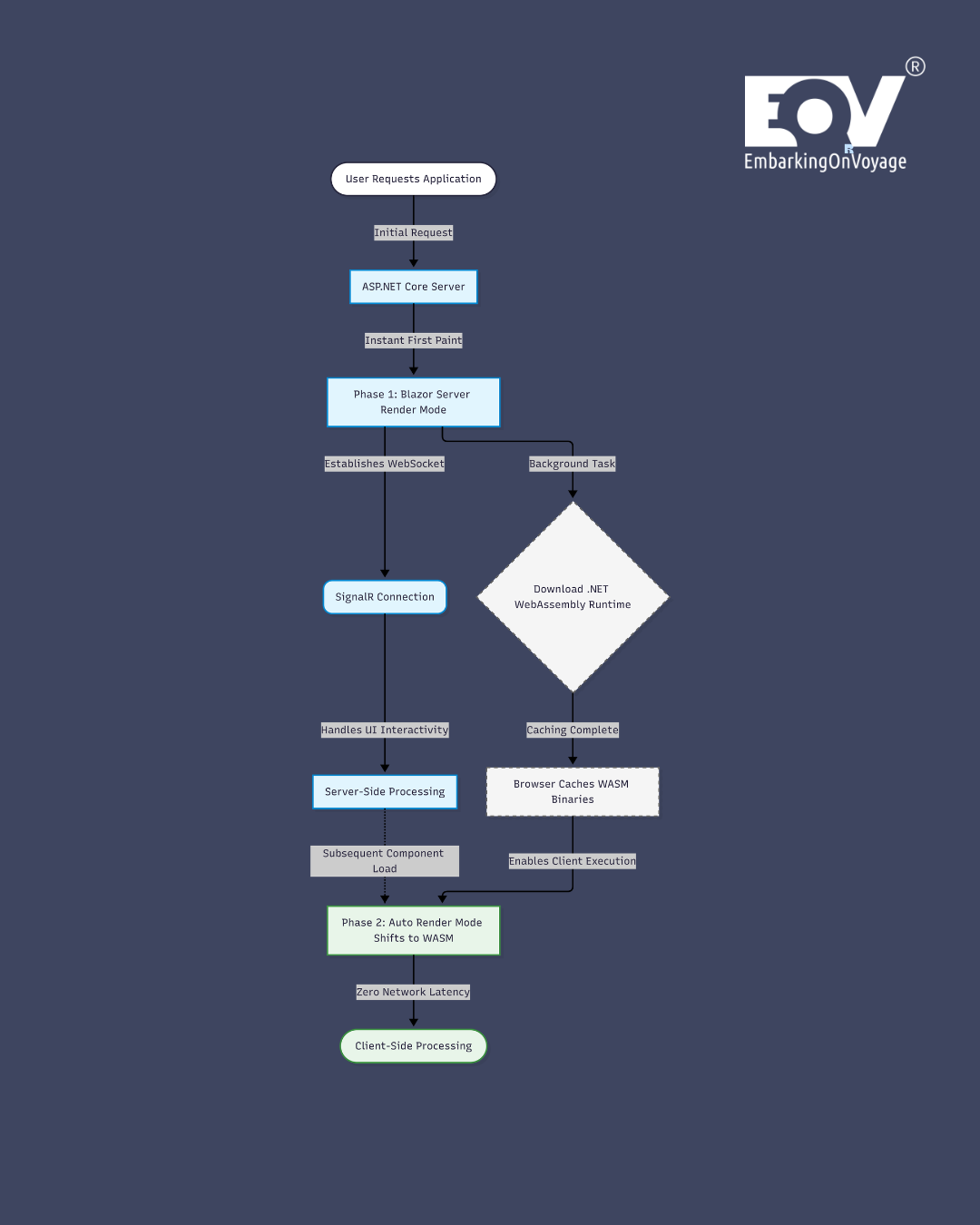
The most pragmatic architecture for 2026 is the Auto Render Mode. This hybrid approach delivers the optimum balance of speed and scalability.
When a user requests a page, the component is initially rendered via Blazor Server, providing an instant user interface. Concurrently, the WebAssembly runtime is silently downloaded in the background. On subsequent visits, the component executes entirely via WebAssembly, instantly freeing up server resources and eliminating network latency for UI interactions.
Configuration Example: Below is the standard configuration in the Program.cs file required to enable these dual rendering modes securely.
// Program.cs configuration for Blazor Web App
var builder = WebApplication.CreateBuilder(args);

// Register services for both Server and WebAssembly rendering
builder.Services.AddRazorComponents()
    .AddInteractiveServerComponents()
    .AddInteractiveWebAssemblyComponents();

var app = builder.Build();

// Map components and enable the Auto Render mode fallback
app.MapRazorComponents<App>()
    .AddInteractiveServerRenderMode()
    .AddInteractiveWebAssemblyRenderMode();

app.Run();
Note: Ensure your data access logic is properly abstracted into interfaces, as WebAssembly components must call an API rather than accessing the database directly.
Security & Compliance Considerations
Zero-Trust and European Data Privacy When transitioning components from Blazor Server to WebAssembly, the security perimeter fundamentally shifts. Because Blazor Server executes within your protected network, it is inherently easier to secure. WebAssembly, however, downloads DLL files directly into the user’s browser.
Engineers must adopt a Zero-Trust security posture. You must never hardcode secrets, API keys, or proprietary business logic into a WebAssembly component, as any user can inspect the payload via browser developer tools.
To maintain GDPR compliance and enforce Tech Sovereignty, all data retrieval in WebAssembly must route through secured, authenticated web APIs. Teams must implement explicit Data Lineage tracking to ensure that PII (Personally Identifiable Information) fetched by the client-side WebAssembly app is encrypted in transit, never cached locally without consent, and strictly confined to designated European cloud regions.
The Bottom Line
- Design for component-level rendering: Stop treating your application as a monolith; use Blazor Server for instant loading on static pages and WebAssembly for heavy, interactive client-side components.
- Implement Auto Render Mode: Utilise the hybrid approach to achieve immediate first-paint speeds while offloading steady-state processing to the client’s CPU, saving thousands in server costs.
- Enforce Zero-Trust via APIs: Treat all WebAssembly code as public domain, securing all data access behind strict APIs to guarantee GDPR compliance and data privacy.
Transitioning from legacy monoliths to highly optimised, hybrid .NET architectures requires precise engineering and rigorous security standards. EmbarkingOnVoyage builds these scalable Blazor solutions for enterprise partners, ensuring your digital products deliver peak performance, absolute compliance, and tangible business growth.
Latest Blog Highlight : https://embarkingonvoyage.com/blog/building-voice-user-interfaces-3-essential-steps-to-lower-latency/
References:
Microsoft Learn – Blazor Render Modes: https://learn.microsoft.com/en-us/aspnet/core/blazor/components/render-modes
Microsoft Learn – Blazor Hosting Models: https://learn.microsoft.com/en-us/aspnet/core/blazor/hosting-models
Leave a Reply